For practitioners and clinics
More than one conversation a week.
Built for practitioners who want to give their clients more.
No card needed to start · DKK 79/month per practitioner excl. VAT afterwards · unlimited clients
Got a login from your practitioner? Log in here
The whole client journey in one place
How many systems does it take when a new client starts with you?
Booking in one place, the questionnaire in another, records in a third — and the client in a fourth app altogether. Who keeps track of it all?
Here it all fits together:
- 1
The client books
Online, whenever it suits the client. The appointment lands in your calendar straight away.
- 2
The programme is bought, the client is set up
The client buys the programme on your own website, with your own payment — and is set up in your clinic with a login to the app.
- 3
The questionnaire before the session
The client automatically gets a questionnaire before the first session and answers in the app. The answers — plus their own goals and exercise — are ready in the record.
- 4
The first session
Now you are ready for the first session, where goals, the meal plan and any other plans for the programme are set up.
- 5
The record
At every session you keep the client's record in line with Danish law — and the client can follow along in their own profile.
- 6
The plan
Together you set up the meals in the meal plan and how the energy is split. You can also make several standard plans to suit the client, such as for training days and rest days.
- 7
The client logs
From here the client logs their own food and exercise, and keeps a diary and notes on their days until the next session.
- 8
You stay in touch
Keep the client up to date along the way with a comment in their diary, posts in the clinic's groups and/or your own newsletter.
- 9
The progress
You follow the client's progress across the board — food, exercise and goals. Clients can buy new programmes and follow-ups as needed, or carry on in the app on their own once the programme ends.
For clients
A calorie counter they actually want to open.
Today's goal at the top, the meals below. Clients see at a glance how much is left, and whether their split of carbs, protein and fat matches what you agreed.
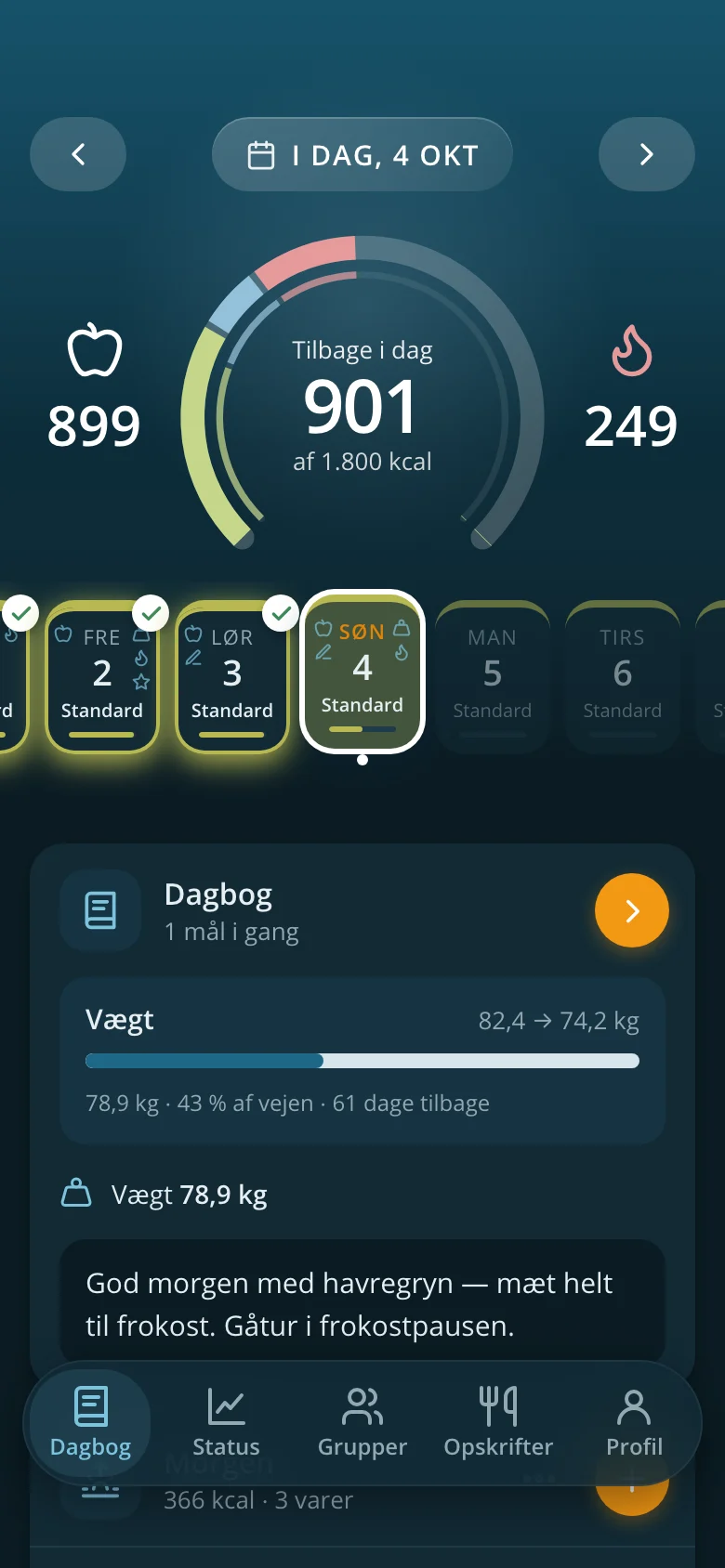


- Works on every phone — add it to the home screen like an app, no App Store needed
- Exercise is turned into calories based on the client's own weight
- The clinic's own recipes and groups
- Day types, such as training day and rest day, each with its own goal
For the practitioner
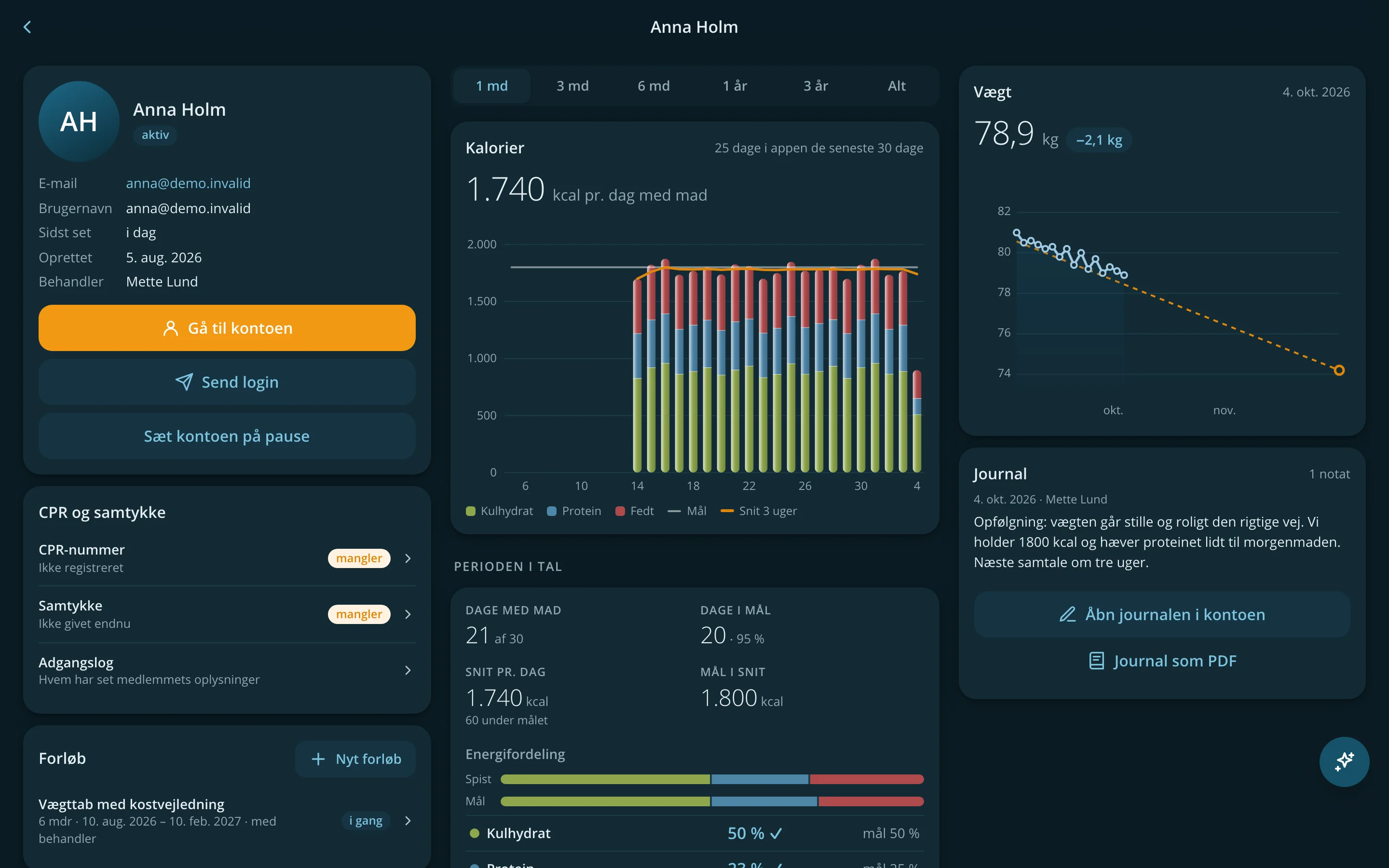
The whole clinic on one screen.
The same app, built out for the desk. You see who is using it, who has gone quiet and whose programme ends soon — and one click takes you to the client.
- Members Activity, food logging and weight across the clinic, and who could use a nudge.
- The client's page Calories, energy split, weight, programme and record in one place.
- Plan in the client's account Step in as the client and build the day — with the mouse or the keyboard alone.
- Meal plan as PDF The day's plan, ready to print or send.
- New clients in a minute Welcome email with login, programme and groups in one go.

At the desk, it's a real working tool.
On a big screen the app opens up: the day's meals side by side, statistics over months and years, and keyboard shortcuts for the things you do often. On the phone it stays simple for the client.
- Records by the book The record meets the Danish requirements for health records kept by health professionals — so you don't have to think about it.
- Goals that can move Calories and energy split per week or per day.

Calendar and booking
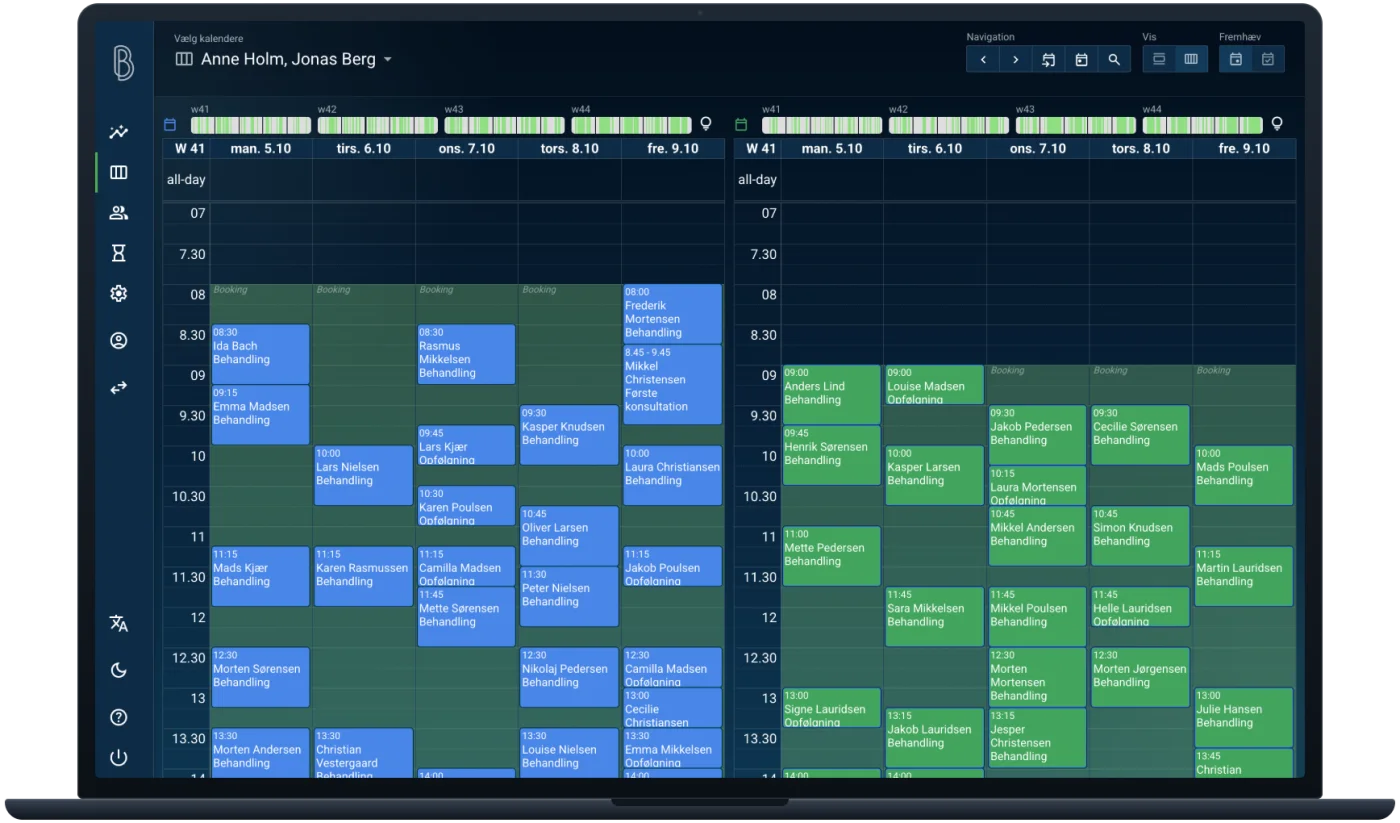
The whole clinic's calendar — and clients book themselves.
Online booking with behandler-booking.dk, whenever you want it. Appointments sit on the client's page, next to their food, weight and record.
- Calendars side by side Every practitioner's calendar in one view — and in Google Calendar, if that's where you live.
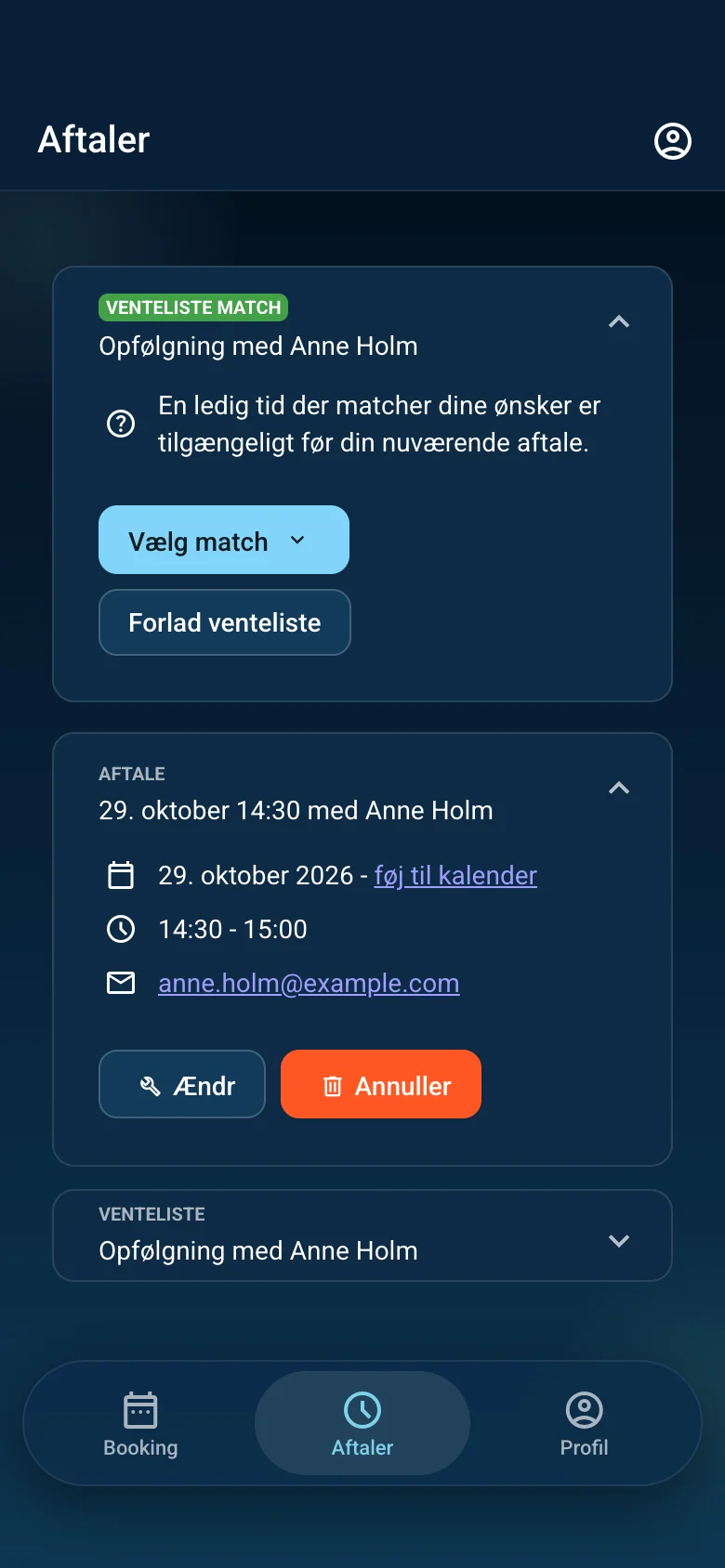
- Online booking Clients find a time themselves, around the clock — with reminders, so fewer forget to turn up.
- Waiting list When someone cancels, the next person on the list is offered the slot.
- Insight A simple overview of the week's bookings, and who comes back.
The whole package
Everything a practice needs — with AI built in.
At the core: food, records and follow-up. The AI assistant helps write recipes, your website and your newsletter — and you approve before anything goes out.
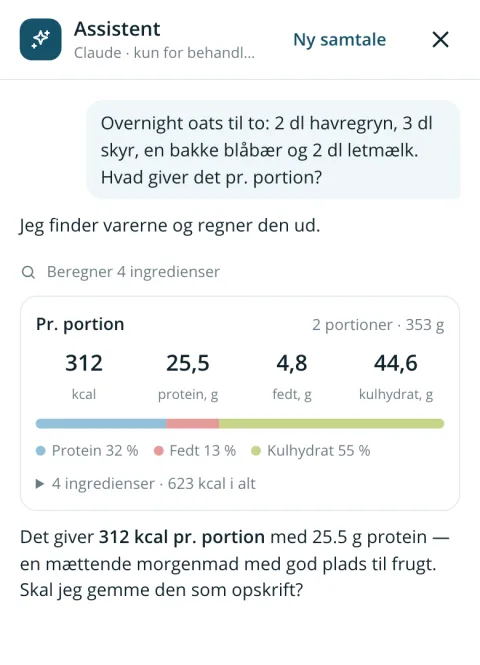
AI assistant for recipes
Describe a dish, paste in a recipe or snap a photo — the assistant finds the foods and works out the nutrients and energy split per portion.
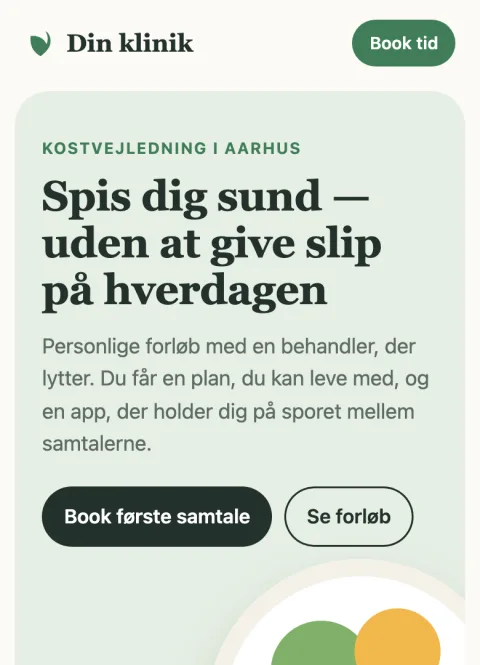
Your clinic's website, built by AI
Your own website — with your name, your look and your own domain. Tell the assistant what it should say. It builds and edits while you watch, and puts it online when you approve.
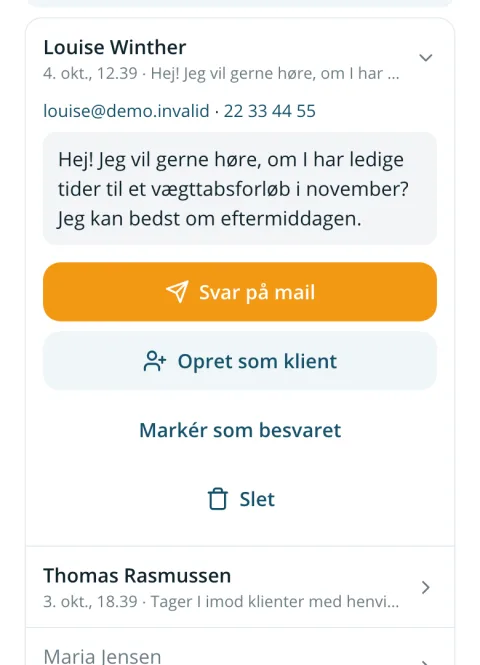
Contact form on your website
Enquiries from your website land with you — in the app and in your inbox. Reply with one tap — or make the sender a client straight away.
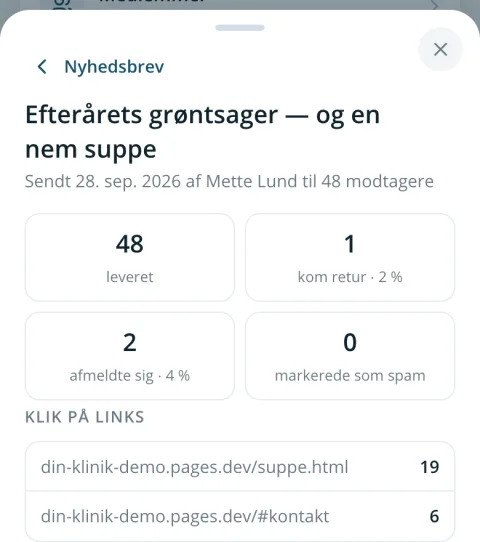
Newsletter for your clients
Clients sign up themselves — in the app, in the questionnaire or on your website. The assistant helps you write it, you see it before it's sent, and you can follow how it was received.
The contact form and newsletter are included in the subscription. The AI assistant is built in and paid for by use — a recipe typically costs less than DKK 1.
GDPR-ready from day one. Data in the EU, encrypted CPR numbers, two-factor login and the data processing agreement ready when the clinic is created.
How to get started
From sign-up to first client in an afternoon.
- 1
Create the clinic
Name, CVR number and address. You read and accept the data processing agreement along the way — and you're up and running.
- 2
Invite your clients
Add them with name and email. They get a welcome email and choose their own password.
- 3
Follow along
Clients log on their phones. You see it all and write up the record after you've talked.
Price
One price per practitioner. Clients included.
You pay for your practitioners — not for the number of clients. Try everything for 14 days before you decide.
DKK 79/month
per practitioner, excl. VAT
- Unlimited clients
- Everything in the app — on the phone and at the desk
- AI assistant for recipes and website — paid by use
- Contact form and newsletter for your clients
- Your clinic's own website on your own domain (optional) — DKK 19/month
- Online booking with behandler-booking.dk (optional) — DKK 19/month per calendar, on the same invoice
- 14-day free trial, no card needed
- Monthly subscription — cancel any time
When the programme ends, clients can carry on by themselves for DKK 29/month incl. VAT — and the clinic gets half, excl. VAT, taken off its next invoice.
Questions
Do clients need to download an app?
No. The app opens in the browser and can be added to the home screen, so it starts like an app. It works on iPhone, Android and computer.
What does it cost the clients?
Nothing while they are on a programme with you — the clinic pays per practitioner. Afterwards, clients can choose to carry on for DKK 29/month, and the clinic gets half the amount, excl. VAT, as a discount.
Can several practitioners in the clinic share clients?
Yes. Every practitioner in the clinic sees the clinic's clients, and each practitioner can have their own. Practitioners are added and paused under Clinic.
What does the AI assistant cost?
It is paid by use, together with the subscription: a recipe typically costs less than DKK 1, a whole website from scratch DKK 5–15. There is a free allowance during the trial. If you have your own API key with Anthropic, you can use that instead — then you pay Anthropic directly.
Where is the data kept?
In the EU: server and database with DigitalOcean in Frankfurt, backups and email with Amazon Web Services in Ireland. It's all in the data processing agreement, which you read before the clinic is created.
What happens if we stop?
You delete the clinic under Clinic. First you get every record as a PDF — one file per client in a single ZIP — so you can keep them yourselves. Then everything is deleted, including the clinic's encryption key.
Is the old NetSlank still around?
Yes, for now. The app is NetSlank today, but the classic desktop version can still be used for what the app can't do yet — such as editing recipes and meal plans. Open the classic desktop version.
I'm a client — how do I get started?
Your practitioner sets you up and sends you an email with a link where you choose your password. If you already have a login, you can log in here.
Write to us
Questions about NetSlank, a walkthrough for your clinic or help getting started — write, and we'll reply by email.
Ready to try it?
14 days free, no card needed. Creating the clinic takes two minutes.